Published: August 12, 2026
Category: Education & Examination Guide
By: SKY-LIMIT TECHNOLOGY
The West African Examinations Council (WAEC) has released the 2026 West African Senior School Certificate Examination (WASSCE) results, giving candidates the opportunity to check their examination performance online.
If you sat for the 2026 WAEC examination in Nigeria and want to view your grades, you can check your result using the official WAEC result-checking portal. Candidates may also use other supported methods, including the WAEC result-checking mobile application and SMS.
In this guide, SKY-LIMIT TECHNOLOGY explains what you need before checking your result, how to retrieve your result-checking details if you do not have them, how to check your result online, and what to do if you encounter an error.
What You Need to Check Your WAEC 2026 Result
Before attempting to check your result, have the following information available:
- Your WAEC Examination Number
- Your Examination Year: 2026
- Your Examination Type
- Your WAEC Serial Number
- Your WAEC Result Checker PIN
- A smartphone, tablet or computer with internet access
The official WAECDIRECT result portal currently requires the examination number, examination year, examination type, PIN and Serial Number before a result can be displayed.
What is the WAEC Examination Number?
Your WAEC examination number is the candidate number assigned to you for the examination.
For current examinations, the WAECDIRECT portal describes it as a 10-digit number, consisting of the seven-digit centre number followed by the three-digit candidate number.
Make sure you enter the number exactly as it appears on your examination documents.
How to Get Your WAEC 2026 Result Checker PIN and Serial Number
One important change candidates should be aware of is that WAEC provides a facility for candidates to obtain their Serial Number and PIN for result checking.
If you already have your valid result-checking details, you can proceed directly to the result portal.
If you do not have them, follow the recovery/generation process provided through the official WAEC platform.
See Complete Guide below
How to Retrieve WAEC 2026 PIN and Serial Number Using Candidate Number and NIN
Step 1: Visit the Official WAEC Website
Go to the official WAEC website:
WAEC’s current digital platform includes an option for obtaining a Serial Number and PIN for result checking.
Step 2: Select the Serial Number and PIN Option
Look for the option relating to Serial Number & PIN or result-checking credentials.
Step 3: Select the 2026 Examination
Select the appropriate examination year and examination type/diet applicable to your result.
Step 4: Provide Your Candidate Information
You may be required to provide identifying information associated with your WAEC registration.
Recent instructions for the 2026 result-checking process indicate that candidates may be required to provide their examination number and the NIN used during registration, together with their email address and telephone number for OTP verification.
Step 5: Complete OTP Verification
If an OTP is sent to your registered contact information, enter the OTP to complete the verification process.
Once successfully verified, you can obtain or recover the Serial Number and PIN required for checking your result.
How to Check WAEC 2026 Result Online
After obtaining your Serial Number and PIN, you can check your result through the official WAECDIRECT portal.
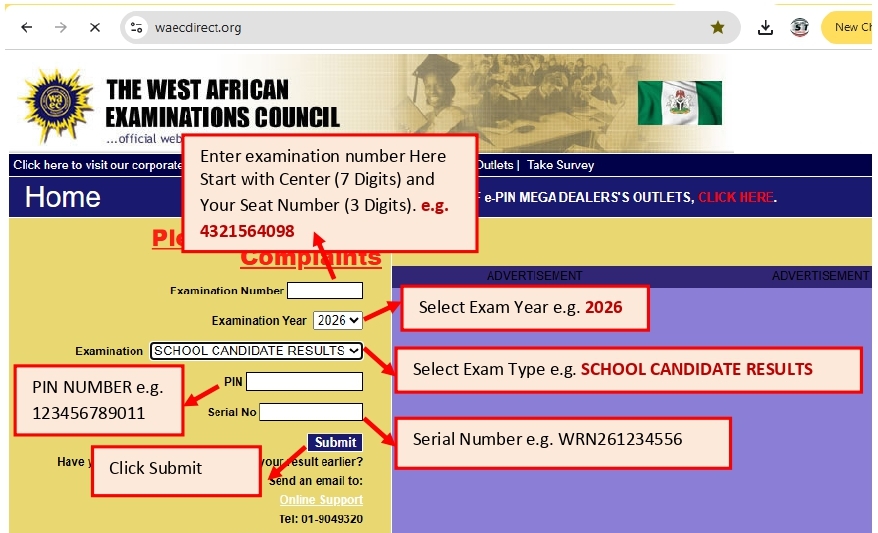
Step 1: Open the WAEC Result Portal
Visit:
WAEC Result Checker — WAECDIRECT
This is the official WAECDIRECT result-checking portal for WAEC Nigeria.
Step 2: Enter Your Examination Number
Enter your 10-digit WAEC Examination Number in the appropriate field.
Double-check the number before continuing because entering an incorrect examination number can prevent the system from finding your result.
Step 3: Select the Examination Year
Select: 2026
Step 4: Select the Examination Type
Choose the examination type that corresponds with the examination you sat for.
Step 5: Enter Your PIN
Enter the WAEC result-checking PIN supplied or obtained through the WAEC process.
Step 6: Enter Your Serial Number
Enter the corresponding Serial Number.
The PIN and Serial Number must correspond to the result you are attempting to check.
Step 7: Submit Your Details
Click Submit.
The portal will process the information and, if the details are correct and the result is available, your WAEC result should appear on the screen. The official WAECDIRECT instructions confirm that candidates submit the examination information and wait for the results window to display.
What You Will See on Your WAEC Result
When your result loads, you should be able to view your performance in the subjects you registered for.
Your result may contain information such as:
- Examination details
- Candidate information
- Subject names
- Grades obtained
- Other result-related information provided by WAEC
Take your time to check each subject carefully.
If the portal provides an option to print or save the result, keep a copy for your personal records.
Can I Check WAEC Result with My Phone?
Yes.
You do not necessarily need a desktop computer to check your WAEC result.
You can use a smartphone or tablet with a reliable internet connection to access the WAECDIRECT website.
For the best experience:
- Open Chrome, Safari or another modern browser.
- Visit the official WAEC result portal.
- Enter your examination details.
- Submit the information.
- Wait for your result to load.
Avoid clicking on unofficial websites claiming to provide WAEC results.
How to Check WAEC 2026 Result with the WAEC Mobile App
Candidates can also use the official WAEC Result Checker application where supported.
The general process is:
- Download the WAEC Result Checker application from the appropriate official app store.
- Open the application.
- Enter your WAEC examination number.
- Select the examination year.
- Enter your Serial Number.
- Enter your PIN.
- Submit the information.
- View your result.
The mobile application provides another way for candidates to access their results without relying solely on the web portal.
How to Check WAEC Result by SMS
WAEC also provides an SMS result-checking option.
The official WAECDIRECT portal currently displays the SMS format as:
WAECExamNoPIN*ExamYear
The portal identifies 32327 as the short code for its SMS service and states that the SMS service carries a charge.
For example, the format would look like:
WAEC4250101001123456789012*2026
Do not insert spaces between the information.
Because SMS services and supported networks can change, candidates should confirm the current instructions displayed by WAEC before sending an SMS.
What If Your WAEC Result Is Not Showing?
Do not immediately assume that your result has been cancelled or withheld.
There can be several reasons why a result may not display.
1. Incorrect Examination Number
Check your examination number carefully.
A single incorrect digit can prevent the system from locating your result.
2. Wrong Examination Year
Make sure you selected 2026 rather than another examination year.
3. Wrong Examination Type
Confirm that you selected the correct examination category.
4. Incorrect PIN or Serial Number
Verify that the PIN and Serial Number were entered correctly.
5. Heavy Traffic on the WAEC Website
When results are newly released, a large number of candidates may attempt to access the portal simultaneously.
This can make the website slow or temporarily unavailable.
The WAECDIRECT FAQ notes that result-checking difficulties can occur because of internet connectivity problems or high traffic on the result-checking website.
6. Internet Connection Problems
Try switching between Wi-Fi and mobile data or reconnecting to your network.
What to Do If You Get an Error Message
If the result portal displays an error:
First, do not panic.
Check the following:
- Examination number
- Examination year
- Examination type
- PIN
- Serial Number
- Internet connection
Then try again.
If the problem continues, use WAEC’s official support channels rather than paying an unofficial person who claims they can “unlock” or “fix” your result.
The WAECDIRECT FAQ advises candidates experiencing result-checking problems to provide the error message and relevant examination details when seeking assistance.
Can I Print My WAEC 2026 Result?
Yes. Once your result is displayed, you can save or print the result for your records.
If you are using a smartphone, you can also save a digital copy where the portal/browser provides an appropriate print or save option.
However, remember that a printed result obtained from the online checker is not necessarily the same thing as the official certificate.
WAEC Result vs WAEC Certificate
These two should not be confused.
WAEC Result
Your result shows your examination performance, including your grades in the relevant subjects.
It is useful when you need to confirm your performance after the release of results.
WAEC Certificate
The certificate is the formal examination credential issued by WAEC.
WAEC has also introduced a digital certificate platform through which candidates can access, share and verify certificates where the service is available.
Therefore, checking your online result should not be interpreted as receiving your final certificate.
Important Safety Tips for WAEC Candidates
With thousands of candidates searching for their results, fake websites and fraudulent result-checking services can appear online.
Follow these precautions:
Use the Official WAEC Platforms
For result checking, use:
For WAEC’s broader digital services, use:
Do Not Give Your PIN to Strangers
Your result-checking credentials should be treated as private information.
Be Careful with Social Media Links
Do not assume a website is genuine simply because someone shared it on Facebook, WhatsApp, TikTok or another social platform.
Avoid Fake “Result Upgrade” Services
No legitimate individual should promise to change your WAEC grades for money.
If you believe there is a genuine problem with your result, contact WAEC through its official channels.
Quick WAEC 2026 Result-Checking Checklist
Before checking your result, make sure you have:
- 10-digit WAEC Examination Number
- Examination Year — 2026
- Correct Examination Type
- WAEC Serial Number
- WAEC Result Checker PIN
- Internet-enabled phone or computer
- Reliable internet connection
Then:
- Open the official WAECDIRECT website
- Enter your examination number
- Select 2026
- Select the correct examination type
- Enter your PIN
- Enter your Serial Number
- Submit
- Review your grades
- Save or print your result for future reference
Frequently Asked Questions About WAEC 2026 Results
Is the WAEC 2026 result available online?
Yes. The 2026 WAEC results can be accessed through the official result-checking system once the relevant result has been released and uploaded.
Where can I check my WAEC 2026 result?
You can use the official WAECDIRECT result portal:
What do I need to check my WAEC result?
You generally need your examination number, examination year, examination type, Serial Number and PIN.
Can I check WAEC result with my phone?
Yes. A smartphone with an internet connection can be used to access the result portal.
Can I check WAEC result without a PIN?
The official result-checking portal requires the appropriate PIN and Serial Number. If you do not have them, use WAEC’s official process to obtain or recover your result-checking credentials.
What if I forgot my WAEC PIN?
Use the official WAEC platform’s Serial Number and PIN facility to recover or obtain the necessary information.
Can I check another person’s WAEC result with my PIN?
You should not assume that one result-checking credential can be freely used for another candidate. The WAECDIRECT FAQ states that an e-PIN is associated with the result being checked and misuse can result in an error.
What should I do if the WAEC website is not opening?
Wait and try again later, check your internet connection, or use another browser/device. Newly released results can attract heavy traffic to the portal.
Final Advice to 2026 WAEC Candidates
Checking your WAEC result should be straightforward as long as you use the correct examination details and the official WAEC platforms.
The safest approach is simple:
Get your correct examination details → obtain/recover your WAEC PIN and Serial Number → visit the official WAECDIRECT portal → enter your information carefully → view and save your result.
Do not rely on unofficial websites or individuals claiming they can access, upgrade or alter your result.
If you experience a genuine problem while checking, use WAEC’s official support channels for assistance.
Good luck to all 2026 WAEC candidates!
Official WAEC Resources
WAEC Result Checker (WAECDIRECT)
This article is published by SKY-LIMIT TECHNOLOGY for educational and informational purposes. Candidates should always confirm current instructions directly from WAEC before submitting examination information or making any payment.
