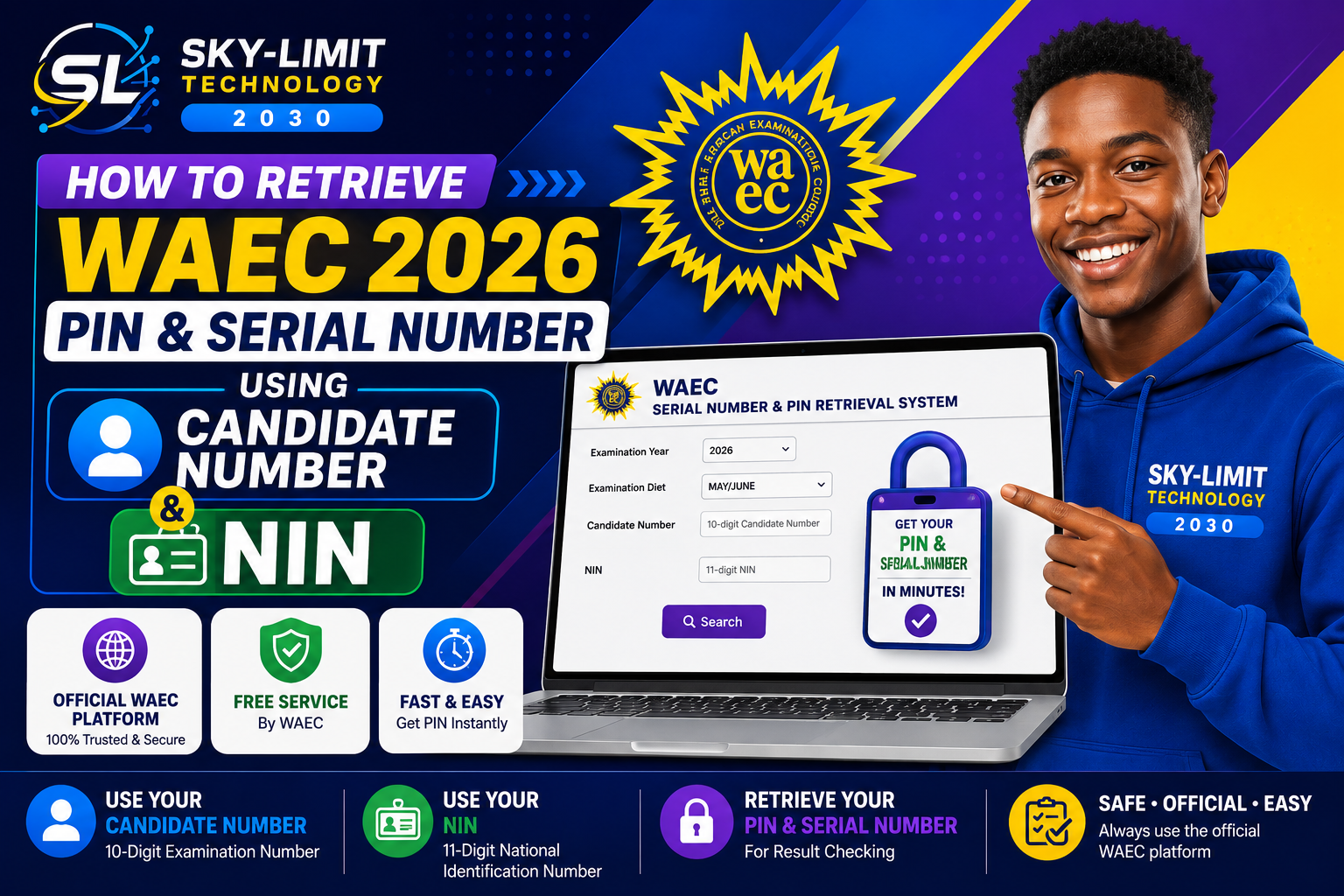

WAEC 2026 Result Checking: You Need Your PIN and Serial Number First
If you are one of the candidates waiting to check your 2026 WAEC result, there is an important step you should complete before attempting to check the result online.
You need your WAEC PIN and Serial Number.
For the current WAEC digital result-checking process, candidates can retrieve their Serial Number and PIN through WAEC’s official online platform instead of relying on an old-style scratch-card process.
WAEC’s official website currently advertises a service called “Get Your Serial Number & PIN Instantly, For Free”, specifically for result checking.
The official retrieval system is available at:
WAEC Serial Number & PIN Retrieval System
This means candidates should first retrieve their result-checking credentials and then use those credentials to check their 2026 WASSCE result.
What Are the WAEC PIN and Serial Number?
The WAEC PIN and Serial Number are the result-checking credentials required by the WAEC result-checking system.
The official WAECDIRECT result checker currently asks candidates to provide:
- Examination Number
- Examination Year
- Examination Type
- PIN
- Serial Number
The result-checking portal then processes the information before displaying the candidate’s result.
Therefore, if you do not yet have your PIN and Serial Number, you should complete the WAEC retrieval process before trying to check your result.
Is the WAEC Scratch Card Still the Process for 2026?
Candidates who are familiar with the traditional WAEC scratch-card method may be wondering what has changed.
For the 2026 digital process, WAEC provides an official Serial Number & PIN Retrieval System through its website.
Rather than simply looking for a physical scratch card, candidates should follow the official WAEC process to retrieve the credentials associated with their examination record.
WAEC’s main website specifically promotes the new service as a free way to obtain the Serial Number and PIN for result checking.
Important: Do not rely on unofficial websites or individuals claiming to generate a WAEC PIN for you. Start from the official WAEC website.
What Do You Need to Retrieve Your WAEC PIN and Serial Number?
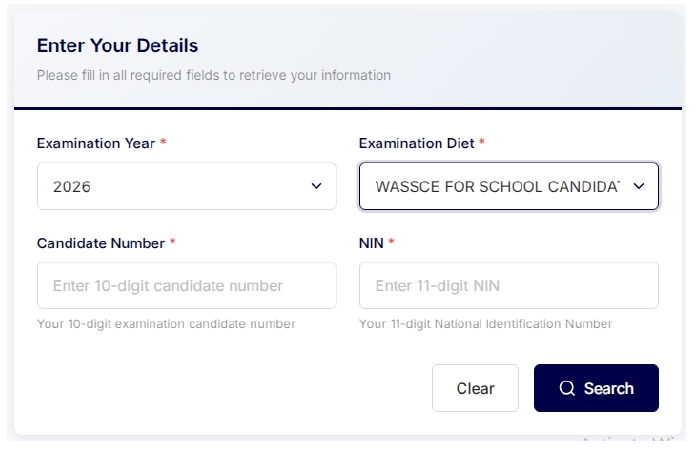
Before starting the process, have these details ready:
1. Examination Year: For candidates checking the 2026 result: 2026
2. Examination Diet: Select the examination diet that corresponds to your WAEC examination.
3. Candidate Number: You need your 10-digit WAEC Candidate Number.
The official retrieval portal specifically identifies this as your 10-digit examination candidate number.
4. NIN: You also need your 11-digit National Identification Number (NIN).
The official WAEC retrieval system identifies the NIN requirement as an 11-digit National Identification Number.
How to Retrieve WAEC 2026 PIN and Serial Number
The process is straightforward if you have your Candidate Number and NIN.
Step 1: Visit the Official WAEC Website
Start from the official WAEC website:
This is the recommended starting point because it helps you avoid fake websites and unofficial result-checking services.
Step 2: Find “Serial No. & Pin” on the Menu
After opening the WAEC website, look through the main navigation/menu.
Find:
Serial No. & Pin
Click this option.
WAEC currently lists the Serial Number & PIN service on its official website and describes it as a service for obtaining the credentials needed for result checking.
Step 3: Open the WAEC Retrieval System
After selecting Serial No. & Pin, you will be directed to the official WAEC Serial Number & PIN Retrieval System.
The official page is:
Serial Number & PIN Retrieval System
The page is titled:
Serial Number & PIN Retrieval System — WAEC
It contains fields for your examination information and identification details.
Step 4: Select Examination Year
Locate the:
Examination Year
field.
Select:
2026
Make sure you select the year in which you actually sat for the examination.
Step 5: Select Examination Diet
Next, select:
Examination Diet
Choose the appropriate diet associated with your examination.
Selecting the wrong diet may prevent the system from matching your information correctly.
Step 6: Enter Your Candidate Number
Enter your 10-digit Candidate Number.
Make sure every digit is correct.
Do not add unnecessary spaces or characters.
The official retrieval portal specifically instructs candidates to enter their 10-digit examination candidate number.
Step 7: Enter Your NIN
Enter your 11-digit NIN in the NIN field.
Check the number carefully before proceeding.
Your NIN is an important part of the identification process on the WAEC retrieval system.
The official WAEC portal specifically requires an 11-digit NIN.
Step 8: Click “Search”
After entering all your information, review the details carefully.
You should have:
Examination Year: 2026
Examination Diet: Correct examination diet
Candidate Number: 10 digits
NIN: 11 digits
Then click:
Search
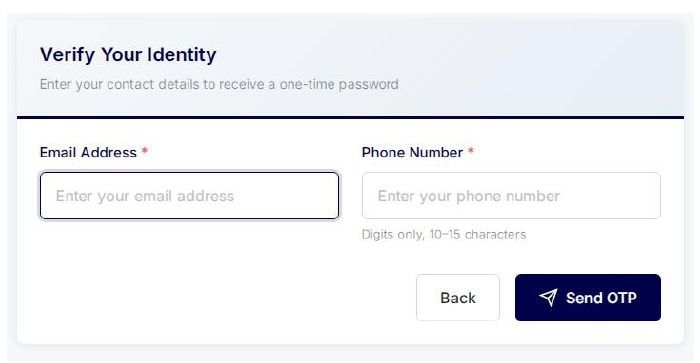
Email Address and Phone Number
You will be redirected to another window where you will Enter the below information:
Enter your Email Address
Enter your Phone Number
The System will Send you OTP on the EMAIL you enter
Enter the OTP and Click Search
The system will check the information you submitted against the relevant WAEC records.
Step 9: Retrieve Your WAEC PIN and Serial Number
If your information is successfully matched, the system will provide the relevant:
PIN and Serial Number
These are the details you need for the next stage — checking your WAEC result.
Save them somewhere secure.
Do not share your PIN, NIN or other personal examination information publicly.
What Happens After You Retrieve the PIN and Serial Number?
Once you have successfully obtained your credentials, you can proceed to the WAEC result checker.
Visit:
WAECDIRECT Official Result Checker
The WAECDIRECT result checker requires the candidate’s examination information, including the examination number, examination year, examination type, PIN and Serial Number.
In simple terms:
Retrieve PIN & Serial Number → Go to WAECDIRECT → Enter Examination Details → Submit → View Result
Why You Should Retrieve Your PIN Before Checking Your Result
Many candidates may go directly to the WAEC result checker and discover that they do not have the required PIN and Serial Number.
This can delay the process.
To make result checking easier, complete the retrieval process first.
Your preparation should look like this:
Candidate Number + NIN
↓
WAEC Serial No. & PIN Retrieval
↓
PIN + Serial Number
↓
WAECDIRECT Result Checker
↓
2026 WAEC Result
What If You Cannot Retrieve Your PIN?
If the WAEC system does not return your PIN and Serial Number, first check the information you entered.
Check Your Candidate Number
Confirm that you entered the correct 10-digit Candidate Number.
Check Your NIN
Make sure your NIN contains exactly 11 digits and that you entered the correct number.
Check Your Examination Year
For the 2026 examination, select: 2026
Check Your Examination Diet
Make sure you selected the correct examination diet.
Try Again Later
If your information is correct but the service is temporarily unavailable, try again later.
Avoid paying unofficial agents to “generate” or “unlock” your WAEC PIN.
Is the WAEC PIN and Serial Number Retrieval Free?
Yes.
WAEC’s official website currently describes the service as:
“Get Your Serial Number & PIN Instantly, For Free.”
It also describes these credentials as being for result checking.
Therefore, candidates should be cautious about anyone demanding payment simply to perform the official retrieval process on their behalf.
Be Careful With Fake WAEC Websites
The release of WAEC results usually creates significant online activity.
Candidates may encounter websites, WhatsApp messages, Facebook posts or individuals claiming to provide WAEC result-checking services.
Do not enter your NIN and Candidate Number into an unknown website.
For maximum safety, start from:
Then select:
Serial No. & Pin
from the official menu.
You can also access the official retrieval system directly:
WAEC Serial Number & PIN Retrieval
Do Not Share Your NIN or PIN Publicly
Your NIN and examination details are personal information.
Avoid posting screenshots containing:
- NIN
- Candidate Number
- PIN
- Serial Number
- Examination details
on WhatsApp groups, Facebook, TikTok or other public platforms.
If you need assistance from someone, it is safer to have them guide you through the process while you enter your own personal information yourself.
Quick WAEC 2026 PIN & Serial Number Guide
Here is the process at a glance:
- Visit: WAEC.org
- Open: Main Menu
- Select: Serial No. & Pin
- Select: Examination Year — 2026
- Select: Correct Examination Diet
- Enter: 10-digit Candidate Number
- Enter: 11-digit NIN
- Click: Search
- Retrieve: PIN and Serial Number
- Visit: WAECDIRECT
- Enter: Examination Number, Year, Examination Type, PIN and Serial Number
- Check: Your WAEC 2026 Result
Frequently Asked Questions
Do I need a WAEC PIN and Serial Number to check my 2026 result?
Yes. The official WAECDIRECT result checker requires the PIN and Serial Number as part of the result-checking information.
Where can I retrieve my WAEC PIN and Serial Number?
You can retrieve them through the official WAEC Serial Number & PIN Retrieval System at:
What information is required?
The retrieval system currently asks for the examination year, examination diet, 10-digit Candidate Number and 11-digit NIN.
How many digits is the Candidate Number?
The official retrieval system requires a 10-digit Candidate Number.
How many digits is the NIN?
You need an 11-digit NIN.
Do I have to buy a scratch card before retrieving my PIN?
The current official WAEC website provides a free Serial Number and PIN retrieval service for result checking.
Can I retrieve my PIN with my phone?
Yes. The retrieval system is online and can be accessed using a smartphone, tablet or computer with internet access.
What if I enter my correct details and the system does not find me?
Recheck your Candidate Number, NIN, examination year and examination diet. If the information is correct and the issue continues, use WAEC’s official support channels rather than an unofficial agent.
Final Reminder for 2026 WAEC Candidates
Before you attempt to check your 2026 WAEC/WASSCE result, make sure you have your PIN and Serial Number ready.
The official process is:
WAEC.org
↓
Serial No. & Pin
↓
2026 + Examination Diet
↓
10-Digit Candidate Number
↓
11-Digit NIN
↓
Search
↓
Retrieve PIN & Serial Number
↓
WAECDIRECT Result Checker
↓
Check Your WAEC Result
The most important thing is to use the official WAEC platforms and protect your personal information.
Good luck to all 2026 WAEC candidates!
Official WAEC Links
WAEC Main Website:
www.waec.org
Serial Number & PIN Retrieval:
serial-pin.waec.org
WAEC Result Checker:
WAECDIRECT
This article is published by SKY-LIMIT TECHNOLOGY for educational and informational purposes. WAEC may update its procedures, requirements or digital services. Candidates should always confirm the latest instructions on the official WAEC website.
